How to Turn Off Sump Pump Alarm Step by Step?
To turn off your sump pump alarm, first locate the reset button on the control panel and press it firmly for 3 to 5 seconds until the alarm stops.
If that doesn’t work, check power outlets and battery backup. Then try power cycling by unplugging the unit and disconnecting the battery if applicable.
Also, inspect the float switch and clear any obstructions. For smart systems, mute alarms via the app.
For persistent issues, deeper troubleshooting or expert help may be necessary.
Key Takeaways
- Locate and press the sump pump reset button for 3 to 5 seconds to silence the alarm and confirm reset by alarm light turning off.
- Power cycle the pump by unplugging it for at least 30 seconds; for battery backup, disconnect AC power, then battery cable before reconnecting.
- Use the smart app to mute the alarm temporarily by selecting the mute button and confirming the choice in the app settings.
- Verify the float switch is free and manually lift it to ensure the pump activates and the alarm stops.
- Check power supply and battery backup status; reset or replace battery if needed, as alarm won’t stop without resolving power issues.
Locate and Use the Sump Pump Reset Button

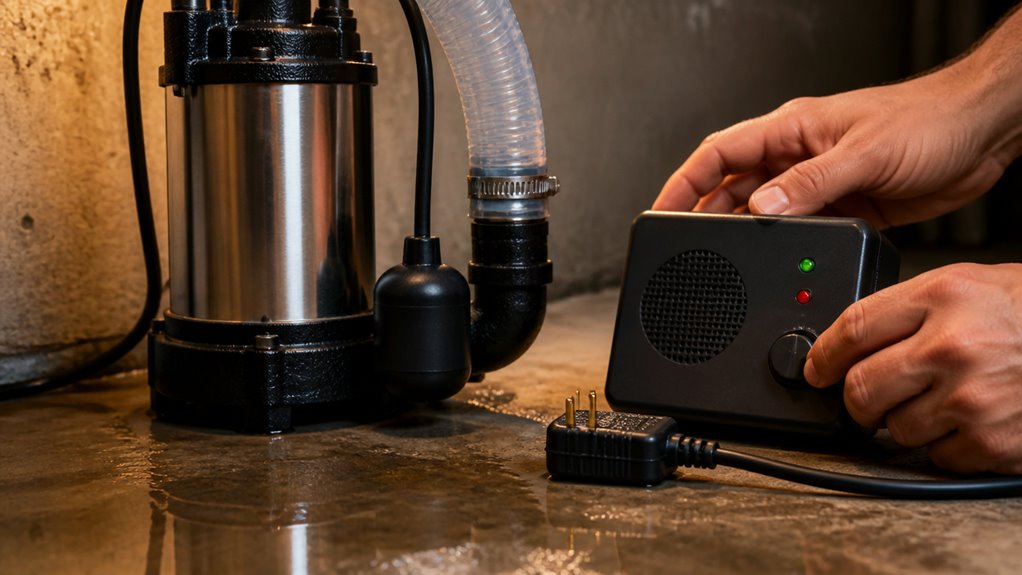
Start by locating the sump pump control panel, usually mounted near the pump or on a basement wall.
Once found, identify the reset button, often labeled “Reset,” “Mute,” or “Silence.”
Locate the reset button, typically labeled Reset, Mute, or Silence, to quickly silence the alarm.
Press and hold this button firmly for 3 to 5 seconds to deactivate the alarm.
You should observe the alarm light turning off or hear a clicking sound, which confirms the reset process.
Afterward, monitor the sump pump to make sure it resumes normal operation.
This quick reset clears false alarms without interrupting the pump’s function.
Remember, the reset button won’t address power issues or battery backup faults, so focus solely on silencing the alarm via the control panel for immediate relief.
This method minimizes downtime and keeps your system responsive.
For continued protection, regular maintenance and inspections can help prevent localized clogs that may trigger sump pump alarms.
Check Power and Reset Battery Backup
After you’ve silenced the alarm using the reset button, the next step is to verify the power source and battery backup system.
Use a voltage tester or plug in a lamp to confirm the outlet supplies power.
Check the battery backup box near the pump for any low battery indicators.
To reset the battery system, disconnect the black lead from the negative terminal, wait 2 to 3 minutes, then reconnect it.
This often silences the alarm if triggered by battery issues.
If the alarm persists, test the battery voltage; replace it if it’s old or failing.
Ensuring reliable power and a functional backup battery is essential for proper sump pump alarm operation, preventing false alarms and ensuring readiness during power outages.
Regularly inspecting and maintaining your sump pump system can help avoid water damage and extend the life of your equipment.
Inspect Sump Pump Water Levels and Float Switch
Sure! Here’s a more conversational version:
First up, take a look at the water level in your sump pit. You want to see if the rising water has set off the alarm. It’s a good indicator that something might be going on.
Next, let’s check out the float switch. Look closely for any debris or anything that could be getting in the way of its movement. If you spot any buildup around the float, go ahead and clear it out. You want to make sure it can move freely and accurately signal the pump when needed.
Also, remember to monitor water levels carefully during pumping to avoid sudden pressure changes that could affect the pump’s operation.
Check Water Levels
Frequently, high water levels in the sump pit trigger the alarm, signaling a potential issue with drainage or pump operation. To address this, you need to promptly check the water level and ensure proper pump response.
Visually inspect the sump pit water level; it should remain below the float switch activation point.
Verify the float switch moves freely without obstruction from debris or sediment.
Clear any debris around the float switch to prevent false alarms or pump failure.
Confirm the pump activates when water reaches the float’s triggered position by manually lifting the float.
If water remains high, investigate discharge line clogs or consider a secondary pump for increased capacity.
Regularly monitoring water levels keeps your sump pump system reliable and prevents unnecessary alarm activation.
For enhanced maintenance, consider using a durable workbench with organized storage to keep your sump pump tools and parts accessible and protected during inspections.
Examine Float Switch
Inspect the float switch closely to make certain it moves freely and isn’t obstructed by debris or sediment.
Check the sump pit water level, as a high level may trigger the alarm.
Manually lift the float switch to simulate rising water and observe if the pump activates.
If the pump doesn’t respond, the float switch mechanism could be faulty or stuck.
Verify the float switch travels vertically without resistance.
Any binding or snagging may cause false alarms or pump failure.
Confirm the switch wiring is intact and securely connected to the control panel.
Addressing float switch issues promptly prevents malfunction and unnecessary alarm triggers.
Accurate float movement is critical for correct sump pump operation and timely water level detection.
Regular maintenance and inspection of components like the float switch help prevent system malfunctions and ensure reliable operation.
Clear Float Obstructions
You should regularly clear any debris or sediment that might block the float switch’s movement to guarantee accurate water level detection. An obstructed float can cause false alarms or prevent the pump from activating. To maintain proper function, inspect the sump pit and float switch carefully.
Check water level in the sump pit to confirm if it’s triggering the alarm.
Remove leaves, dirt, or sediment around the float switch.
Manually lift the float to test if the pump activates correctly.
Make certain the float moves freely without sticking to the pit walls.
Address any clogging in the discharge line causing water backup.
Keeping the float switch clear ensures reliable operation and helps you effectively silence false sump pump alarms.
Additionally, regularly monitor moisture levels and inspect for any signs of mold growth to prevent potential water damage after sump pump issues.
Fix Sump Pump Discharge Line and Mechanical Problems
Clear any clogs in the sump pump discharge line to guarantee efficient water flow and prevent alarm triggers.
Begin by inspecting the entire length of the discharge pipe for blockages, including bends and outdoor outlets. Use a plumber’s snake or high-pressure water to clear debris.
Next, verify the pump motor runs smoothly; listen for unusual noises indicating mechanical failure or motor burnout.
Check electrical connections for corrosion or loose wires, repairing or replacing as needed. If the pump fails to activate or water isn’t discharged properly after clearing clogs, test the float switch’s movement, ensuring it triggers the pump.
Persistent mechanical problems may require professional servicing or replacement. Addressing these issues promptly prevents alarm recurrence and maintains sump pump reliability.
Regular inspection and maintenance of sump pump components, similar to practices recommended for subsurface drainage, improve system longevity and performance.
Reset Your Sump Pump by Power Cycling
Resetting your sump pump by power cycling can quickly resolve alarm issues caused by electronic glitches or temporary faults. This method forces the system’s electronics to reboot, often silencing false alarms and restoring normal function.
To do this effectively:
Unplug the sump pump’s power cord from the wall outlet. Wait at least 30 seconds to allow full discharge of internal components. If your unit has a battery backup, unplug the AC power first, then disconnect the battery cable.
Make certain all indicator lights turn off before reconnecting power. Plug the power cord back in and reconnect the battery if applicable.
After power cycling, verify the alarm is silent and the pump operates normally. This quick reset often eliminates nuisance alarms without needing further intervention.
Additionally, it is important to inspect wiring regularly since mold can damage electrical wiring by corroding metal and degrading insulation, which may affect sump pump operation.
Use Smart App Controls to Mute the Alarm
Smart sump pump systems let you quickly mute alarms through their dedicated smartphone apps, streamlining control without physical interaction.
Smart sump pump apps enable quick alarm muting, offering convenient control without needing to be near the device.
To start, open the manufacturer’s app and locate the settings icon, usually found on the bottom bar.
Select the specific sump pump unit triggering the alarm from the device list. Next, tap the yellow mute button to disable the audible alarm.
Confirm your choice by selecting “Yes” on the prompt to stop the alarm sound. This method allows you to silence the alarm remotely, providing immediate relief while you address the underlying issue.
Keep in mind the app won’t fix mechanical problems, so use this feature as a temporary measure. Then inspect or service your system promptly to prevent water damage.
Proper maintenance and timely servicing are essential to avoid long-term system failure and ensure reliable sump pump operation.
When to Call a Professional for Persistent Sump Pump Alarms?
If your sump pump alarm keeps going off despite following all troubleshooting steps, it’s time to bring in a professional. Persistent alarms often indicate underlying issues beyond basic fixes.
You should call an expert when:
- The pump fails to activate or runs continuously without stopping.
- Electrical faults or power issues persist after resets.
- Discharge lines remain clogged despite your intervention.
- The backup battery system malfunctions repeatedly.
- Mechanical components like float switches or motors show signs of failure.
A professional technician will diagnose complex electrical problems and perform mechanical repairs. They’ll ensure your sump pump system operates reliably.
Don’t delay service, as prolonged malfunction risks basement flooding and costly water damage. Prompt expert help guarantees efficient sump pump alarm resolution and peace of mind.
Frequently Asked Questions
How Often Should I Test My Sump Pump Alarm System?
You should test your sump pump alarm system at least once every three months to make sure it’s working correctly.
Regular testing helps you catch potential issues early, like battery failure or sensor malfunctions.
After heavy rains or storms, test it again to confirm proper operation.
Don’t forget to check backup batteries and float switches during testing.
Consistent maintenance keeps your system reliable and prevents unexpected flooding.
Can Extreme Weather Affect Sump Pump Alarm Sensitivity?
Yes, extreme weather can affect your sump pump alarm sensitivity.
Heavy rain or rapid snowmelt can cause sudden water level spikes, triggering the float switch frequently.
Freezing temperatures might cause the float or sensors to stick or malfunction.
You should regularly inspect and clear debris around the float switch and verify the alarm response during storms to guarantee accurate operation.
Consider installing a secondary pump or backup system for increased reliability in severe weather.
What Maintenance Prevents Sump Pump Alarm False Triggers?
Like tuning a finely tuned instrument, regular maintenance prevents sump pump alarm false triggers.
You should clean the float switch and sump pit to remove debris that could block movement.
Inspect and clear the discharge line to avoid clogs.
Test the battery backup frequently and replace old batteries.
Also, verify electrical connections are secure and check the control panel for malfunctions.
These steps keep your system precise and reliable.
Are There Noise-Reducing Covers for Sump Pump Alarms?
Yes, you can find noise-reducing covers designed specifically for sump pump alarms.
These covers typically feature sound-absorbing materials like foam or insulated panels that dampen alarm noise without obstructing airflow or sensor function.
When installing, make sure the cover doesn’t block vents or interfere with alarm reset buttons.
Using these covers helps minimize noise pollution while maintaining alarm effectiveness, especially in living spaces or finished basements where quiet operation is important.
How Long Do Sump Pump Alarm Batteries Typically Last?
Sump pump alarm batteries typically last between 3 to 5 years, depending on usage and battery type.
You’ll want to regularly check for low battery indicators to avoid unexpected failures.
If your alarm keeps sounding despite resets, it might be time to replace the battery.
Using high-quality alkaline or sealed lead-acid batteries can extend life.
Always refer to your unit’s manual for the recommended battery specifications and replacement intervals.
Turn Off Your Sump Pump Alarm the Safe Way
By following these steps, you can quickly silence your sump pump alarm and get things back on an even keel.
Whether you reset the button, check the battery backup, or inspect the float switch, addressing the root cause prevents false alarms from driving you up the wall.
If problems persist, don’t hesitate to call a professional. Sometimes it’s best to let the experts handle the heavy lifting to keep your basement dry and worry-free.